My Homelab Setup in 2026
I enjoy reading what other people are doing with their homelab setups, and inspired by recent blog I decided to sit down and write about the state of my own homelab at the start of 2026.
The whole homelab sits in my workshop, located at the basement of our house:
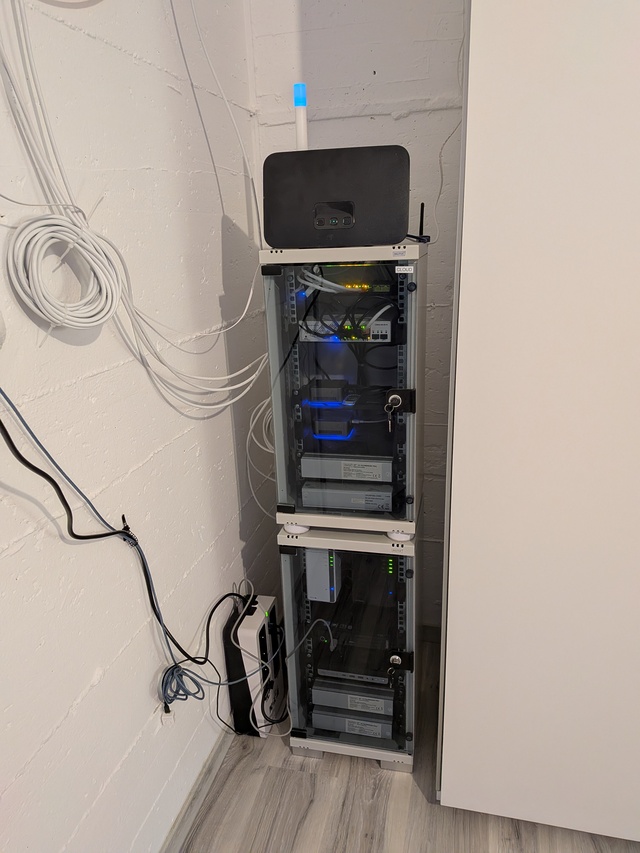
One thing that is obvious is that the setup has evolved. I started building it while we were living in an apartment and I didn't have a lot of space so I started with 10” mini rack. Now, there are two :).
I will not go into too much detail, since, of course, for each element shown here there's a lot of background, or it is performing multiple tasks. So, let us start with the equipment that is outside.
Eaton 3S 850 DIN
Everything is behind this UPS, you can see it down on the left, and with current idle usage of 180W it can keep it running for about 18 minutes. That is enough when I am dealing with electricity. My plan is to replace it with LiFePO4 based UPS once they became more available.
Telekom.de Speedport Smart 4 Plus
Internet router. Currently vDSL, but cabling for fiber-to-home is almost ready. Don't get me started about the state of German infrastructure :)
Nabu Casa Z-Wave Long Range ZWA-2
So Z-Wave devices can talk with my Home Assistant setup. It's the white stick with blue light on the top.
Sonoff Zigbee 3.0 USB Dongle Plus
For all Zigbee devices. Most of sensors in our home talk via Zigbee network and this little fellow you can see to the right of the Telekom.de router handles it all with grace.
Now let us peek what's inside the top rack, starting from the top. At the bottom of each rack are electricity plugs, those gray blocks. I like to keep them inverted. Each rack also has temperature/humidity sensor which are barely visible on the photos.
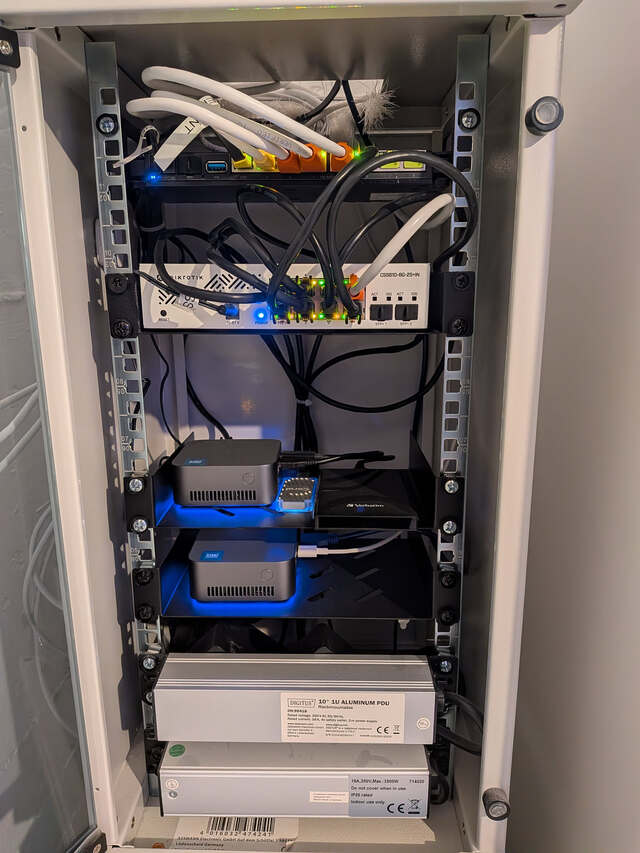
Mikrotik RB5009
This is the network backbone. This awesome little device routes all the traffic and gives power to 4 Mikrotik cAP ax access points, one for each floor, that are not shown here.
Mikrotik CSS610
Active switch. It is there because RB5009 doesn't have enough ports :) It tags certain traffic, for example from outside surveillance cameras, otherwise it would be replaced with very cheap one. It is very hard to buy crappy switch these days.
Blackview MP80 – Frigate
Mini PC that runs Frigate NVR, and only that. This Frigate setup has 8 active cameras and even though it has little Google Coral edge TPU accelerator for ML tasks it is constantly around 40-60% CPU usage.
Blackview MP80 – Home Assistant
I installed Home Assisant OS on it's own dedicated Mini PC. It pretty much runs the house, and more than 200 devices are reporting it. Still, it is usually around 2% CPU usage. I didn't expect that, and if I knew I'd have it as Proxmox VM. But it is what it is, for now.
Now we move to the bottom rack.
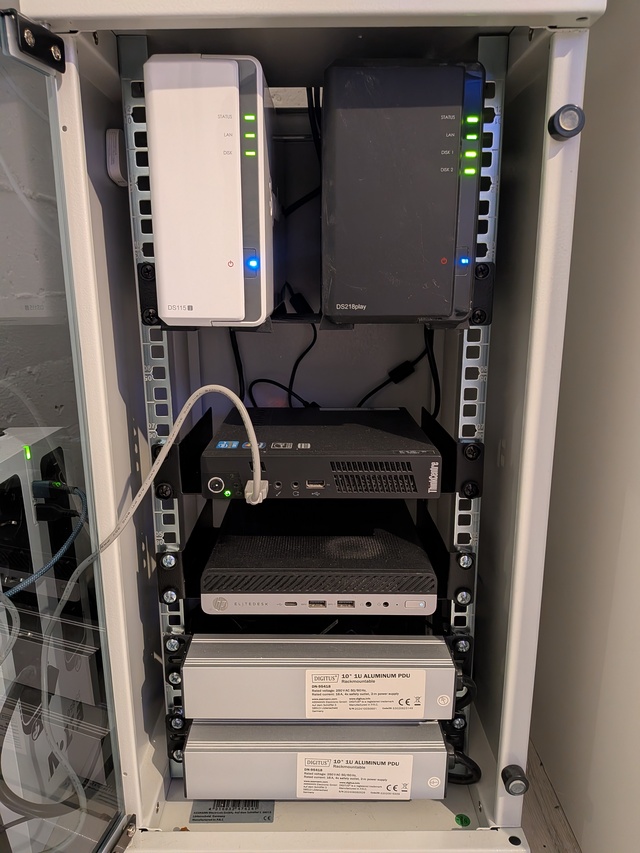
Synolgoy DiskStation DS115j
This was my first NAS. It has been running for more than 10 years with the same 2TB disk inside. I don't use it for anything important, but I like to have it around, it's family friend after all this time.
Synology DiskStation DS220j
This is the main NAS and it has 2 x 6TB disks inside. All the backups are kept here, from our computers, to network devices. Of course, we keep off-site backups, but only for the things I deemed important. I'll just write we use Hetzner's storage box, without going into too much details.
Lenovo ThinkCentre M72e
Mini PC that runs experiments and most of the Docker Compose based services. From Immich that holds all our photos, to my son's Minecraft and Luanti servers. I had two of these, but one died. It is over 10 years old, but still run really well.
HP Elitedesk 705 G4
Another cheap Mini PC I bought on Ebay. This one is running Proxmox, and in it a bunch of VMs, from our main DNS server to OpenBSD based PKI infrastructure and Zabbix that monitors all of this.
And that is it. I have a lot of plans for my homelab this year (hello LLMs!) and now I am happy I wrote this down so I can compare later. Happy hacking!